
Let’s be honest, Ignite and events just like, result in an abundance of material, information and generally cool stuff being announced, but as human beings, it’s pretty much impossible to digest everything announced in real time.
So, here’s my take on all things Intune related, that got announced during Ignite.
One thing that was inevitable, is that AI would play a big part in the event, like it has all events for the past two years and like it will for the next two plus years as we move forward. In regards to AI and Intune specifically, as in being inter-operational, it’s not really been something that we’ve seen, although it has been asked for repeatedly. Ignite 2025 has kind of changed that.
There were some substantial Intune / device management announcements around AI-driven management and resilience.
AI / Agent-Driven Intune
Intune is embedding Security Copilot chat directly into its UI, so IT admins can ask for guidance and insights using natural language.
- New agent-powered experiences to automate and scale tasks:
- Change Review Agent: analyses proposed changes (for example policy updates) for conflicts and compliance and offers recommendations.
- Policy Configuration Agent: takes natural-language or document-based input and suggests policy settings.
- Device Offboarding Agent: uses signals to identify devices to remove / offboard safely.
Source: Microsoft Ignite 2025 Book of News
Operational Resilience & Recovery
Microsoft introduces Point in Time Recovery and Remote Windows recovery as part of the The Windows Resiliency Initiative (WRI). As part of the WRI Intune can now remotely manage the Windows Recovery Environment (WinRE) across fleets to recover devices that won’t boot or where the user is not present.
- This supports running remote actions and IT folks can run custom scripts in the recovery environment.
- Recovery actions are secured via hardware-bound recovery certificates.
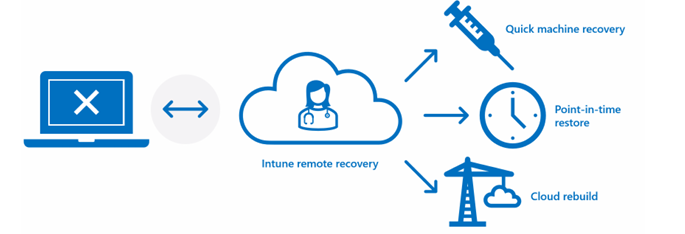
One excellent feature set of the WRI, is Windows Cloud Rebuild. Commonly, when utilising or migrating from platforms and legacy device provisioning solutions such as Imaging, a sticking point is “How” to recover a device without re-imaging. Finally, Cloud Rebuild will plug this gap. Using Cloud Rebuild, administrators can specify the Windows edition and language within the Intune portal, prompting the device to retrieve the installation media and perform a full self-rebuild.
In addition, Point-in-time recovery provides the ability to roll a device back to a specific historical device state, offering a quick fix for issues ranging from update-related failures to driver conflicts and misconfigurations. Microsoft is making this feature available in preview in this week’s Windows Insider build of Windows 11.
Source: What’s new in Microsoft Intune at Ignite – Microsoft Intune Blog
Update Management / Maintenance
Intune will get maintenance windows: a unified way to schedule updates and improve compliance. Maintenance windows are expected to roll out to preview in the first quarter of calendar year 2026.
Source: What’s new in Microsoft Intune at Ignite – Microsoft Intune Blog
Windows Autopatch is bringing Proactive Readiness checks ahead of update deployment, in a bid to reduce manual troubleshooting and preventing any blockers.
Source: Windows Autopatch — Elevate Your Update Experience for Modern Work – Windows IT Pro Blog
Endpoint Privilege Management (EPM)
EPM introduces support for elevation requests from non-primary device users (useful for shared devices).
A readiness dashboard for EPM to oversee rollout, with rule recommendations.
In early 2026, admins will be able to set elevation rules that allow network config changes by users balancing security and productivity.
Source: What’s new in Microsoft Intune at Ignite – Microsoft Intune Blog
App Deployment / Management
Installer script support for Enterprise App Catalog apps has been added to include PowerShell scripts (for prerequisites, custom params, post-install actions). Win32 app support will also receive the option to select Installer type, but this method is expected in Q1 2026.
App Control for Business now allows you to designate Intune Management Extension as a “managed installer”, so apps deployed via Intune are automatically trusted when the Management Extension is recorded as a managed installer.
Source: What’s new in Microsoft Intune at Ignite – Microsoft Intune Blog
Windows Backup for Orgs
Intune-configurable Windows Backup for Organisations allows you to back up user settings and a list of installed Microsoft Store apps for restoration during enrollment or recovery. Allowing devices to be restored to a known-good state quickly.
Source: Windows Backup for Organizations Overview | Microsoft Learn

Leave a Reply