Microsoft Enterprise Application Management is now included with Microsoft 365 E5. So this begs the question, should you still be paying for tools like Patch My PC, Robopack, Remo3?
Keeping third-party applications up to date has traditionally been one of the more time-consuming tasks for endpoint administrators. While Microsoft has steadily improved application management through Microsoft Intune, many organisations have turned to products such as Patch My PC, Robopack, Remo3 and then the likes of Scappman and ManageEngine to automate packaging and updates for common applications. With Microsoft now including Enterprise Application Management (EAM) as part of Microsoft 365 E5, it’s worth asking whether those third-party tools are still necessary.
What is Enterprise Application Management?
Enterprise Application Management provides a Microsoft-managed catalogue of common business applications. Rather than packaging, testing and maintaining installers yourself, Microsoft maintains the application definitions and update lifecycle. Administrators can deploy supported applications through Intune while Microsoft takes responsibility for keeping those packages current. For many organisations, this removes a significant amount of repetitive operational work.
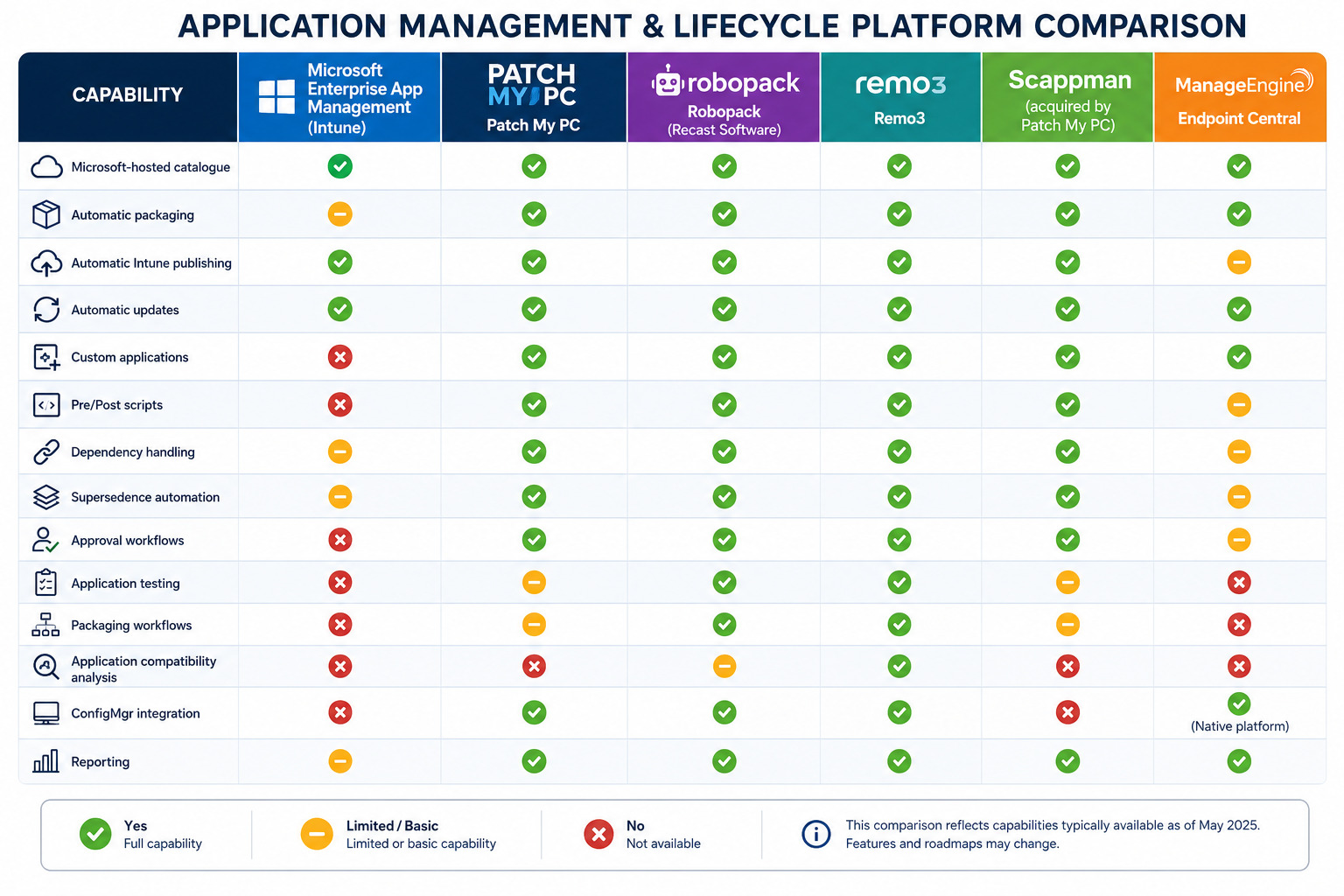
How do these apps compare?
At a high level, almost all of these products maintain their own application catalogue containing:
- Detection rules
- Install commands
- Uninstall commands
- Silent switches
- Return codes
- Version information
- Vendor download locations
- Metadata
- Sometimes dependency relationships
The differences in the tooling lies in what each does with that catalogue.
Microsoft Enterprise App Management (EAM)
This is Microsoft’s native offering inside Intune. Think of it as “Microsoft managing the Win32 packages so you don’t have to.” – A statement that will excite many, I’m sure!
The catalogue currently contains hundreds of popular enterprise applications. A phrase used by most of the applications in this space.
Examples include, but is not limited to, the likes of (like most of the product catalogues!);
- Chrome
- Firefox
- Adobe Reader
- Notepad++
- VLC
- 7-Zip
- PowerShell
- Git
- Visual Studio Code
Microsoft package the application(s) themselves… so when a vendor releases Version 10… Microsoft:
- downloads it
- packages it
- signs it
- uploads it into Microsoft’s service
So you don’t have to… then, Intune simply deploys it.
Strengths
- Native Intune
- Microsoft supported
- Automatic updates
- Zero packaging
- Zero infrastructure
- Very easy
Considerations
- Limited catalogue
- Limited customisation
- No scripting
- No pre/post actions
- No dependency logic
- Windows only
- Doesn’t help with your own applications
Patch My PC
Patch My PC (PMP) remains the benchmark in this area. It is a /very/ popular third-party software management and patching tool used to automate application updates. The PMP Enterprise Publisher allows businesses to integrate with Microsoft Intune and SCCM. And… It does far more than just package applications – It includes:
- Thousands of applications
- Automatic packaging
- Automatic updating
- Automatic publishing to Intune
- Automatic publishing to ConfigMgr
- Automatic supersedence
- Automatic detection rules
- Automatic assignment
- Automatic deployment rings
- Pre/Post scripts
- Branding
- Dependency management
One huge advantage of Patch My PC, is that if Microsoft releases “Microsoft Edge 140”, then Patch My PC can:
- download it
- create Win32 package
- upload into Intune
- supersede previous version
- assign to pilot group
- wait
- then promote to production
without anybody touching it. Automation in action. Neat. And that’s not all, Patch My PC also provides:
- Home Updater
- Publisher
- Advanced Insights
- Reporting
- Vulnerability reporting
- Inventory
- Compliance dashboards
It’s becoming an endpoint application lifecycle platform in itself.
Strengths
- Hundreds of supported applications
- Extremely rapid support for new releases
- Extensive deployment options
- Rich reporting
- Proven reliability
Considerations
- Additional licensing
- Separate infrastructure
- Another product to manage
Robopack
Robopack (by Recast Software) approaches the problem slightly differently. Instead of just shipping packages… It focuses on application lifecycle automation, not too dissimilar to Patch My PC. Examples of its functionality includes:
- Automatic packaging
- Auto updating
- Custom packages
- Dependency chains
- Packaging workflows
- Approval workflows
- Testing
- Rollback
Its main goal is to reduce packaging effort.
Remo3
Remo3 is quite different again. Their speciality isn’t simply packaging. It’s Application compatibility and Application transformation. Historically they specialised in:
- MSI analysis
- Package conversion
- App virtualisation
- Packaging automation
- Testing
More recently they’ve added:
- Intune publishing
- Evergreen updates
- Automation
- Packaging pipelines
Remo3 are popular with organisations carrying lots of legacy applications. However, the toolset on offer fits alongside these other players for sure.
Scappman
Scappman, mentioned only because of the name it once had, was acquired by Patch My PC. Originally it was aimed squarely at cloud-first Intune customers. It offered:
- Evergreen applications
- Automatic Intune publishing
- Simple management
- Lightweight interface
However, today many of its capabilities have been incorporated into Patch My PC’s broader platform. And with that, we don’t really hear about Scappman much, which is a shame. I always used to break out into a round of “Scappman” by Scatman John when it was mentioned.
ManageEngine Endpoint Central
Endpoint Central provides application deployment alongside broader endpoint management, making it attractive for organisations already invested in that ecosystem. However, it introduces another management platform alongside Intune, of which Applications are only one feature.
Endpoint Central includes the ability to manage and perform;
- Patch management
- OS updates
- Third-party updates
- Software deployment
- Imaging
- Remote control
- Asset management
- Compliance
The whole Application catalogue piece is only part of a much larger endpoint management suite, so if you’re already using Intune, much of Endpoint Central overlaps with what you already have.
Having used Manage Engine products in detail in the past, I have a real bugbear with their offerings, in that they’re very clunky, and being brutally honest, I do not find them suitable for enterprise estates. I believe they’re often more suited to SMB.
Recap
The application catalogue is almost becoming a commodity. The value now comes from what surrounds it.
Microsoft EAM – “I’ll give you an app.”
Patch My PC – “I’ll manage the entire application lifecycle.”
Robopack – “I’ll automate packaging and lifecycle.”
Remo3 – “I’ll modernise and transform complex application estates.”
ManageEngine – “I’ll manage the whole endpoint.”
Where Microsoft has the advantage
Enterprise Application Management offers something its competitors cannot. It’s built directly into Intune. There are no additional connectors, synchronisation services or publishing servers to maintain. Administrators continue working in the same console they already use for compliance policies, Windows updates and application deployment. For organisations committed to a cloud-native endpoint strategy, reducing management silos has genuine operational value and it’s easy to imagine future capabilities such as:
- Custom application repositories.
- Package creation from installers.
- Ring-based deployments for application updates.
- Richer approval workflows.
- Dependency visualisation.
- Health monitoring and rollback.
- Integration with Microsoft Defender Vulnerability Management so vulnerable applications can be automatically prioritised.
- AI-assisted package creation, testing and deployment recommendations.
If Microsoft continues to expand EAM, it could eventually overlap with parts of Patch My PC. However, Patch My PC and similar vendors are also evolving quickly, adding advanced automation, analytics, and enterprise workflow features that go well beyond Microsoft’s current offering.
For a typical Intune-only organisation, I’d characterise them like this:
- Enterprise App Management: Excellent if you primarily need Microsoft-managed packaging for common applications and have straightforward requirements.
- Patch My PC: The strongest overall choice for organisations that want to automate third-party application management end to end with minimal operational effort.
- Robopack: Best suited to teams with significant in-house packaging requirements who want to industrialise packaging and lifecycle processes.
- Remo3: Particularly valuable where application rationalisation, compatibility testing, and legacy application modernisation are major concerns.
- ManageEngine Endpoint Central: Makes most sense if you’re looking for a broader endpoint management platform rather than just application lifecycle management.
As a Modern Workplace consultant working primarily with Intune and Autopilot, understanding these distinctions is useful in presales. Rather than comparing them solely on the size of their application catalogues, the more meaningful conversation with customers is about how much of the application lifecycle they want to automate – from packaging and testing through deployment, updates, reporting, and retirement. That shift in focus often reveals why products with similar catalogues have very different value propositions.
So, are dedicated products still better?
For many organisations, the answer rights now, is yes. Patch My PC in particular still supports a significantly larger application catalogue, provides more deployment flexibility and often publishes updates faster than Microsoft’s own catalogue. If your environment depends on niche applications, extensive pre/post-install scripting or complex deployment workflows, dedicated third-party products still have a clear advantage.
My thoughts
Enterprise Application Management won’t replace Patch My PC overnight. But it doesn’t need to. For organisations that simply need to keep Microsoft Edge, Google Chrome, Adobe Reader, Zoom, 7-Zip and other common applications current, Microsoft’s built-in solution may now be entirely sufficient.
For many businesses, “included and good enough” is an incredibly compelling proposition and, in this playing field, something is better than nothing. Especially if it can overnight take away the ongoing application management of a large chunk of your App Catalogue.

Leave a Reply