I had this article in the works, and planned to post it next week. But to strike whilst the iron is hot, Microsoft, specifically Arnab and the Intune team have just posted the following article; Moving from Windows Autopilot to Windows Autopilot device preparation – as such, I’ve fast tracked this article in which I compare the differences. From the Microsoft link, what I find most interesting and most important, is the one sentence highlighted below…
Autopilot device preparation is now the recommended solution for user-driven scenarios.
When Microsoft introduced Windows Autopilot Device Preparation, often referred to as V2 (rightly, or wrongly), the direction of travel was obvious. Microsoft wanted to create a simpler, more modern Windows provisioning architecture. There was, however, a fairly significant limitation. Before enrolment, Intune didn’t really know which physical device it was dealing with and that matters.
Simplifying provisioning is welcome, but we still want “the organisation” to recognise the device, establish ownership and decide which deployment experience it should receive.
Classic Windows Autopilot, often referred to as V1, has historically provided organisations with the ability to register a device with their tenant before the user ever receives it. That pre-existing relationship enables organisations to provide a predictable corporate provisioning experience.
Autopilot Device Preparation initially approached things differently, placing greater emphasis on the user and the enrolment process. Earlier this year, I was involved in an Autopilot Device Preparation product enhancement project, so had some insight and input into these changes and its great to see that Microsoft has now introduced Device Association for Windows Autopilot Device Preparation, and it addresses one of the biggest architectural differences between the two platforms.
This is much more significant than another checkbox appearing in Intune as it changes the conversation around the future of Windows Autopilot.
What is Device Association?
Device Association allows an organisation to establish a trusted relationship between a physical Windows device and its tenant before the device enrols into Intune. Microsoft describes this as binding the device to the organisation. Underneath the surface, it uses the device’s TPM-backed identity and hardware attestation to establish that trust. During association, a tenant-affinity marker is written into the device’s UEFI firmware. When the device subsequently enters the provisioning process, Microsoft can verify that the physical machine is associated with the expected organisation before MDM enrolment begins.
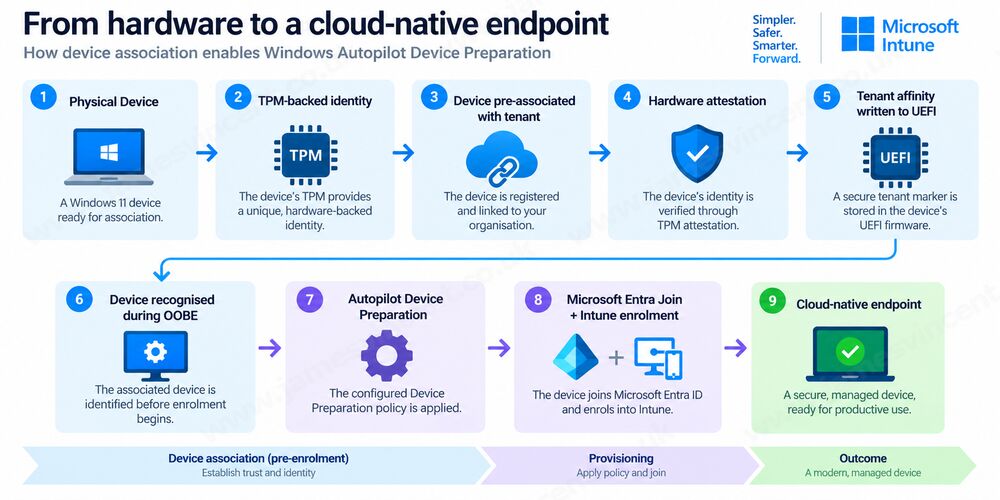
This new workflow, with the pre-enrolment identity unlocks several capabilities that Device Preparation previously lacked, but why?
Why does this matter?
Think about the traditional user-driven enrolment problem. A Windows device starts OOBE. At that point, before authentication and MDM enrolment, how does Microsoft know that this particular machine belongs to your organisation Historically, classic Windows Autopilot (V1) solved this through device registration – i.e.. The device hash was uploaded to “the backend” and linked to your tenant/organisation, which, during OOBE a lookup would be made.
Device Preparation initially used a different architecture. Device Association introduces an explicit trusted relationship before enrolment. That allows Intune to make decisions based upon the device itself rather than relying entirely upon the identity of the user enrolling it. For enterprise deployment, that’s extremely important. Until now, I’d been advising that “V2” wasn’t really “Enterprise ready”, but we’re getting closer for sure.
Why was this previously a problem?
The key limitation of the original Autopilot Device Preparation architecture was that the deployment policy was fundamentally selected from the user who authenticated during OOBE. Microsoft describes the original process explicitly: during OOBE, the user authenticates and, if a Device Preparation policy is assigned to that user, that policy is delivered to the device.
Imagine you have:
James
  │
  ├── Standard Laptop
  │      └── Standard Device Preparation Policy
  │
  └── Developer Workstation
         └── Developer Device Preparation Policy
Before Device Association, both devices essentially arrive at OOBE as anonymous Windows devices from the perspective of Device Preparation policy selection.
James authenticates. Intune knows:
“This is James.”
But it doesn’t yet have a sufficiently strong pre-enrolment device identity to say:
“This is James, but he’s currently enrolling DEV-LAPTOP-001, and therefore I need the Developer provisioning experience.”
That’s what Device Association changes. You can now pre-associate devices using Device Preparation policies:
Standard Laptop
        │
        └──────► Standard Device Preparation Policy

Developer Workstation
        │
        └──────► Developer Device Preparation Policy
James can authenticate to either device and the physical device determines the Device Preparation policy, rather than policy selection relying solely on James’s user-group membership. Microsoft specifically calls this out as a benefit: one user can enrol multiple devices and each can receive a different Device Preparation policy.
That’s a big improvement as it creates much greater flexibility for deployment rings, device personas and potentially different business units or hardware scenarios. It also makes the provisioning process more predictable. The configuration isn’t determined solely by who signs in. The organisation already knows what the device is supposed to become.
Devices are automatically corporate-owned
Another useful consequence is corporate ownership. An associated device is automatically identified as a corporate device. This is particularly important for organisations that configure Intune enrollment restrictions to prevent personally owned Windows devices from enrolling. Previously, organisations adopting Device Preparation could use Windows corporate identifiers to establish that trust. With Device Association, that’s no longer necessary for associated devices. Microsoft explicitly states that Device Association and corporate identifiers are alternative approaches: if a device is associated, you don’t need to upload a corporate identifier as well. That’s a MUCH cleaner model.
What about Group Tags?
Could this replace Group Tags? What even are Group Tags? This is where the distinction with classic Autopilot becomes important. With classic Autopilot, you might register devices and assign Group Tags such as:
Serial       Group Tag
──────────    ─────────────
ABC123        Standard
DEF456        Developer
GHI789        Kiosk
JKL012        Shared
You can then use dynamic Entra device groups based upon the Autopilot OrderID/Group Tag to determine which devices receive particular Autopilot profiles and associated configuration.
Conceptually:
Hardware Hash
     ▼
Autopilot Registration
     ▼
Group Tag = "Developer"
     ▼
Dynamic Device Group
     ▼
Developer Autopilot Profile
That gives classic Autopilot a very useful pre-enrolment classification mechanism. Device Preparation doesn’t use that same model. In fact, Microsoft currently states that its Device Preparation device groups are assigned groups rather than dynamic groups.
Device Association introduces a different mechanism:
Physical Device
      ▼
DeviceLink
      ▼
Pre-associated with tenant
      ├──── Device Preparation Policy
      ▼
TPM attestation
      ▼
Association
      ▼
Provisioning
So it’s not the case that Device Association replaces Group Tags. But more that Device Association provides Device Preparation (V2) with device-level targeting that previously required classic Autopilot administrators to rely on mechanisms such as Group Tags and dynamic device groups.
What about Corporate Identifiers?
Corporate Identifiers weren’t really a deployment-persona mechanism, but were used in the early stages of Device Preparation. They were used to answer a security/ownership question:
“Is this device allowed to enrol?”
For Windows, a corporate identifier could contain the device’s manufacturer, model and serial number. This became particularly important if you configured: Enrollment restrictions > Windows > Personally owned = Block. Without an identifier establishing that the machine was corporate, an Autopilot Device Preparation enrolment could be blocked by the personal-device restriction. Microsoft’s documentation explicitly identifies this behaviour.
So before, we had:
Corporate Identifier
       ▼
"Yes, this is a company device"
       ▼
Allow enrolment
But it didn’t establish the richer relationship: “This physical device belongs to this tenant AND should receive
this Device Preparation policy.”. But Device Association does. And because an associated device is automatically considered corporate-owned, Microsoft says you now choose either Corporate Identifier or Device Association. You don’t need both.
This leaves us with the following…
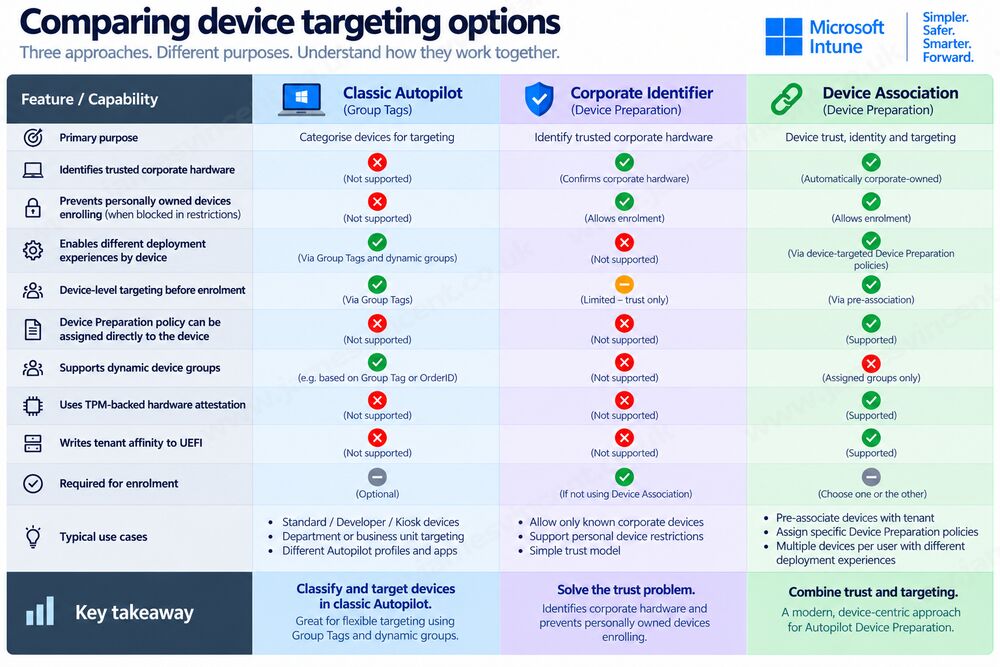
To recap. Before the introduction of Device Association, Autopilot Device Preparation knew who was enrolling the device, but had limited knowledge of what that physical device was supposed to become. Corporate Identifiers could establish that a device was trusted corporate hardware, but they weren’t a deployment-persona mechanism. Device Preparation policy selection remained primarily user-driven.
Device Association changes that relationship. A physical device can now be associated with the tenant before enrolment and assigned a specific Device Preparation policy. This means two devices enrolled by the same user can receive entirely different provisioning experiences.
For administrators familiar with classic Windows Autopilot, this begins to address some of the scenarios historically solved through Group Tags, dynamic device groups and targeted Autopilot profiles, although Device Association is a different architecture and shouldn’t be considered a direct replacement for Group Tags.
It also removes the need to separately upload a Windows Corporate Identifier for an associated device. Microsoft automatically treats pre-associated and associated devices as corporate-owned, including where personally owned Windows enrolment is blocked.
What about Device Naming?
Previously with Device Preparation, Device Naming was impossible and for some (most?) a show stopper – despite many arguments discussions that a naming convention shouldn’t block process (and that process should flex to fit). The good news is that the ability to name a device has also been introduced as part of the associated-device experience. Administrators can now configure a naming template much like that with classic Autopilot, so we can leverage the usual %SERIAL% or %RAND:x% variables. For example, CORP-%SERIAL% or LAPTOP-%RAND:6%.
The resulting name can be up to 63 characters and can contain letters, numbers and hyphens, although it can’t consist solely of numbers. For organisations with established asset-management or naming conventions, this removes another reason to remain with classic Autopilot – assuming policies and procedures can bend to fit with this.
OOBE becomes more controllable
Device Association also unlocks additional Device Preparation OOBE controls. At the time of writing these include:
- Language/Region
- Automatic keyboard configuration
- Hiding Microsoft Software License Terms
- Hiding privacy settings
- Hiding change-account options
- Applying a device naming template
These sound like relatively small changes individually. Collectively, however, they’re important because they make Device Preparation feel increasingly like an enterprise provisioning solution rather than simply a simplified enrolment mechanism. The objective is straightforward. Take a new Windows device out of the box, connect it to the internet, authenticate, and provide the user with a predictable corporate experience – hello to the familiar feeling of classic Autopilot!
How does association actually happen?
First, create the Windows Autopilot Device Preparation policy defining the deployment and OOBE behaviour. Then the device information is exported into a DeviceLink CSV (a bit like Hash collection within Classic Autopilot). For a new device this can be obtained during OOBE. However, Microsoft also supports retrieving the required information from an existing configured machine through its Autopilot diagnostic logs.
For an existing device, administrators can use:
Settings > Accounts > Access work or school > Export your management logs
The DeviceLink CSV can then be extracted from those diagnostics and uploaded to Intune. That potentially makes existing-device migration scenarios much more interesting.
Afterwhich, the DeviceLink information is uploaded into Intune. At this point the administrator is essentially declaring, I expect this physical device to belong to this tenant. At this point a Device Preparation policy can also be assigned.
Then when the device reaches OOBE and connects to the network, the association process verifies the expected TPM-backed identity. Once validated, the tenant-affinity marker is written into UEFI.
A technician can also trigger this immediately after pre-association while working with the device in OOBE.
The device can now proceed through Device Preparation. Because its organisational relationship is already known, the appropriate device-targeted configuration and customised OOBE experience can be applied.
The security model is particularly interesting
This isn’t simply Microsoft storing a serial number in a cloud database. Device Association requires TPM 2.0 and the TPM must be enabled, healthy and not operating in Reduced Functionality Mode. Microsoft performs TPM attestation during the association process to verify the identity of the physical device. This hardware-backed approach makes the association significantly more interesting from a Zero Trust perspective. The organisation isn’t simply trusting information presented by the enrolment process. It’s establishing a cryptographically verifiable relationship with the hardware.
There are important requirements
Device Association isn’t currently available for every Windows machine. At the time of writing, Microsoft requires a physical Windows 11 device running:
- Windows 11 25H2 with KB5120998 or later; or
- Windows 11 24H2 with KB5120998 or later.
Supported editions include Pro, Pro Education, Pro for Workstations, Enterprise, Education and Enterprise LTSC. Virtual machines remain unsupported.
TPM 2.0 is mandatory.
There are also additional network endpoints associated with the device identity and attestation process that organisations will need to permit through firewalls and proxies.
This is something I’d strongly recommend validating before beginning a production pilot.
What happens after a reset?
This is another important architectural detail. Because tenant affinity is stored in UEFI, the relationship isn’t simply an artefact of the installed Windows operating system. That makes the association useful across device lifecycle events such as operating-system reinstallations and resets. In other words, the relationship is with the physical device, not merely that particular Windows installation. That’s precisely what you want from an enterprise provisioning platform. Much like classic Autopilot.
What happens when the device leaves the organisation?
This introduces an equally important lifecycle consideration. Associations need to be removed when a machine is lost, stolen, damaged beyond repair, transferred to another organisation, recycled, sold or retired. Much like classic Autopilot.
However, unlike classic Autopilot, Microsoft doesn’t currently support removing the association directly from Intune. The association information must instead be cleared from the device – which is a bit of a pain. That means organisations adopting Device Association need to add association removal to their device disposal and offboarding process.
This shouldn’t be treated as an afterthought. Provisioning technology always needs a corresponding deprovisioning process. I suspect in due course this will find it’s way into the Intune console, but this is a key takeaway right now.
What about OEM and reseller integration?
This is where things get particularly interesting. Classic Autopilot became extremely powerful because OEMs, distributors and resellers could register devices on behalf of customers. A laptop could effectively arrive at an employee’s house already known to the organisation. Device Association isn’t completely there yet. Microsoft currently states that device uploads are supported through Intune, while OEM and partner pre-association is planned for the future.
For large organisations purchasing thousands of devices directly from hardware partners, this is an important limitation. It’s also probably one of the biggest clues about where Microsoft is taking the platform. Once OEMs can perform Device Association before shipment, the operational model becomes considerably more compelling.
What happens if a device is already registered with classic Autopilot?
Microsoft has also defined how the two technologies coexist. This is important during transition. If a device is registered with classic Windows Autopilot but isn’t associated, the classic Autopilot profile takes precedence. If that same device is associated, Device Association takes precedence and the Autopilot Device Preparation deployment runs instead. So:
| Device state | Provisioning experience |
|---|---|
| Classic Autopilot registered, not associated | Classic Autopilot |
| Autopilot registered + associated | Autopilot Device Preparation |
| Device Preparation associated | Autopilot Device Preparation |
That gives organisations a potential coexistence model while evaluating or migrating between the two technologies. And potentially a headache during the offboarding of devices – although the classic Autopilot hash can be removed remotely via the Intune console at least!
Is this the end of classic Windows Autopilot?
No. At least, not yet. Classic Autopilot remains mature and supports deployment scenarios and ecosystem integrations that Device Preparation hasn’t completely replicated. The OEM/reseller integration point alone is significant for large enterprises. But the gap is narrowing.
When Device Preparation originally arrived, there were several straightforward reasons why an organisation might conclude “Interesting, but classic Autopilot still gives us more control.”
Device Association removes some of those arguments. We now have:
- Pre-enrolment device identity
- Hardware-backed trust
- Device-targeted policies
- Corporate ownership
- Device naming
- Greater OOBE control
- Persistent device affinity
Which is a substantial step forward, and closer to parity with calssic Autopilot.
Which would I choose for a new Intune implementation?
This is where the discussion becomes much more interesting. If I were designing a completely new Intune environment today, I wouldn’t automatically choose classic Autopilot simply because it’s the established approach. I’d evaluate both. Classic Autopilot remains the safer choice where mature OEM integration, existing processes or particular deployment scenarios are critical. But for a genuinely cloud-native Windows 11 estate, Device Preparation is becoming increasingly attractive.
Its architecture is simpler.
Its security model is modern.
And Microsoft is clearly investing heavily in closing the capability gap.
For organisations already using classic Autopilot successfully, there is no immediate reason to migrate simply because Device Association exists. For organisations designing their next provisioning architecture, however, the decision is becoming much less obvious.
Final thoughts
Device Association might sound like a small addition to Windows Autopilot Device Preparation. But it’s not. It addresses one of the fundamental questions any enterprise provisioning system needs to answer, How do I know this physical device belongs to my organisation before the user enrols it?
Microsoft’s answer is now a TPM-backed, hardware-attested relationship between the device and tenant, persisted through a tenant-affinity marker in UEFI. That unlocks device targeting, corporate ownership, naming and greater control over OOBE before enrolment has even taken place. More importantly, it demonstrates where Microsoft appears to be taking Windows provisioning.
Autopilot Device Preparation is no longer simply the newer, simpler, less functional alternative to Windows Autopilot. It’s steadily becoming a genuine successor. And once OEMs and resellers can associate devices before they ever leave the supply chain, the conversation about which Autopilot organisations should be deploying could change very quickly.
And one more thing…
Rather than re-inventing the wheel and writing my own how-to, I noticed rather coincidentally, that Andrew Taylor had linked to Joery Van den Bosch‘s end-to-end configuration guide for Enabling Device Association in Windows Autopilot. So if, after everything you’ve read above, you’re interested in configuring Device Association, head on over to Joery’s page and read through for the how-to <3

Leave a Reply