On Friday 9th October, folks started to experience issues with devices filling their own hard drives to a point they became unusable. The things these devices had in common was that they were all Intune managed.
Late in the day (for us UK based folk) MS published an article (IT1168328) advising of the issue, and provided a work around – which was to remove the contents of “%windir%\Temp\WinGet\defaultState”.
I spent a lot of my time working with clients to resolve this, that I forgot about this platform to post a fix – and… Microsoft had said a fix might be available by the following Monday. However they’re now projecting the 21st for a fix.
There’s plenty of other remediations out there already, but just in case, here’s one I rolled… The detection script retrieves the file size of the \WinGet\defaultState folder, and if over 2GB, remediation to remove the content occurs.
Get-WinGetDefaultStateSize.ps1
# Script: Get-WinGetDefaultStateSize.ps1
# Purpose: Reports the total size of the WinGet defaultState folder.
# Response to Microsoft outage/issue: IT1168328 - 9th October 2025.
# James Vincent

# Define the target folder path
$targetFolder = Join-Path $env:WinDir "Temp\WinGet\defaultState"

# Define the size threshold (2000 MB)
$thresholdBytes = 2000MB

# Verify that the folder exists
if (Test-Path $targetFolder) {
    # Get all files and sum their lengths
    $folderSizeBytes = (Get-ChildItem -Path $targetFolder -Recurse -ErrorAction SilentlyContinue |
        Where-Object { -not $_.PSIsContainer } |
        Measure-Object -Property Length -Sum).Sum

    # Convert bytes to a human-readable size
    if ($folderSizeBytes -ge 1GB) {
        $folderSize = "{0:N2} GB" -f ($folderSizeBytes / 1GB)
    } elseif ($folderSizeBytes -ge 1MB) {
        $folderSize = "{0:N2} MB" -f ($folderSizeBytes / 1MB)
    } elseif ($folderSizeBytes -ge 1KB) {
        $folderSize = "{0:N2} KB" -f ($folderSizeBytes / 1KB)
    } else {
        $folderSize = "$folderSizeBytes bytes"
    }

    Write-Host "Folder: $targetFolder"
    Write-Host "Total Size: $folderSize"

    # Check if size exceeds threshold
    if ($folderSizeBytes -gt $thresholdBytes) {
        Write-Host "ERROR: Folder size exceeds $thresholdBytes limit." -ForegroundColor Red
        Write-Output "Large: $folderSize"
        exit 1
    } else {
        Write-Host "Folder size is within acceptable limits." -ForegroundColor Green
        Write-Output "OK: $folderSize"
        exit 0
    }

} else {
    Write-Output "Not exist: WinGet folder does not exist."
    exit 0
}
Remediate-WinGetDefaultStateSize.ps1
# Script: Remediate-WinGetDefaultStateSize.ps1
# Purpose: Empties the $env:Windir\Temp\WinGet\defaultState directory if over 2GB in size.
# Response to Microsoft outage/issue: IT1168328 - 9th October 2025.
# James Vincent

# Define the target folder path
$targetFolder = Join-Path $env:WinDir "Temp\WinGet\defaultState"

# Define the size threshold (2000 MB)
$thresholdBytes = 2000MB

# Verify that the folder exists
if (Test-Path $targetFolder) {
    # Get all files and sum their lengths
    $folderSizeBytes = (Get-ChildItem -Path $targetFolder -Recurse -ErrorAction SilentlyContinue |
        Where-Object { -not $_.PSIsContainer } |
        Measure-Object -Property Length -Sum).Sum

    # Convert bytes to a human-readable size
    if ($folderSizeBytes -ge 1GB) {
        $folderSize = "{0:N2} GB" -f ($folderSizeBytes / 1GB)
    } elseif ($folderSizeBytes -ge 1MB) {
        $folderSize = "{0:N2} MB" -f ($folderSizeBytes / 1MB)
    } elseif ($folderSizeBytes -ge 1KB) {
        $folderSize = "{0:N2} KB" -f ($folderSizeBytes / 1KB)
    } else {
        $folderSize = "$folderSizeBytes bytes"
    }

    Write-Host "Folder: $targetFolder"
    Write-Host "Total Size: $folderSize"

    # Check if size exceeds threshold
    if ($folderSizeBytes -gt $thresholdBytes) {
        try {
            # Get all child folders and delete their contents forcefully
            Write-Host "Deleting contents of $targetFolder..."
            Get-ChildItem -Path $targetFolder -Recurse -Force | ForEach-Object {
                Remove-Item -Path $_.FullName -Recurse -Force -ErrorAction SilentlyContinue
            }
        }
        catch {
            Write-Output "An error occurred: $_"; Exit 1
        }
    } else {
        Write-Host "Folder size is within acceptable limits." -ForegroundColor Green
        Write-Output "OK: $folderSize"
        exit 0
    }

} else {
    Write-Output "Not exist: WinGet folder does not exist."
    exit 0
}
With this remediation deployed, you can monitor for the effectiveness, by clicking on the Columns button, and adding in the Detection & Remediation outputs.
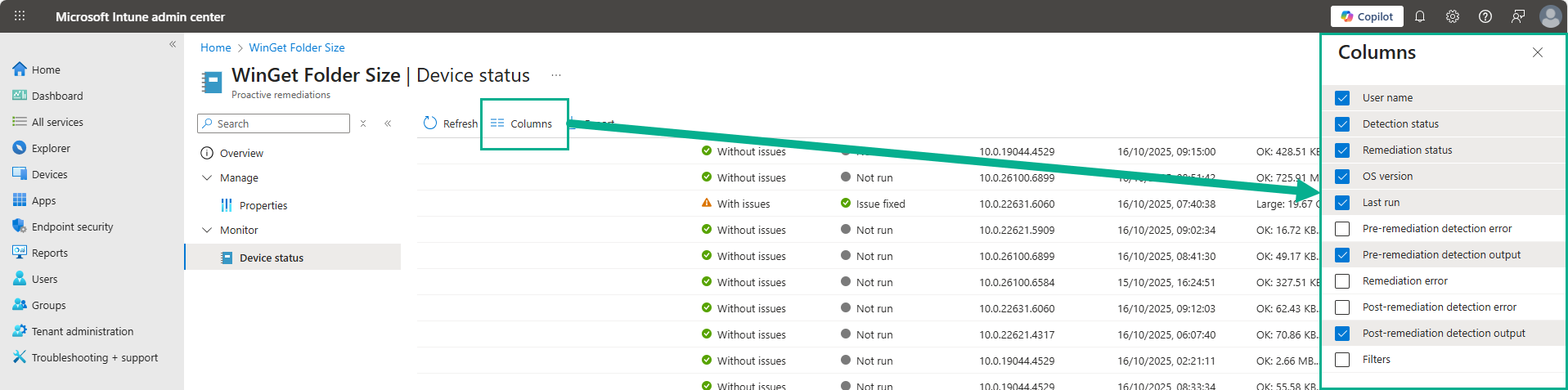
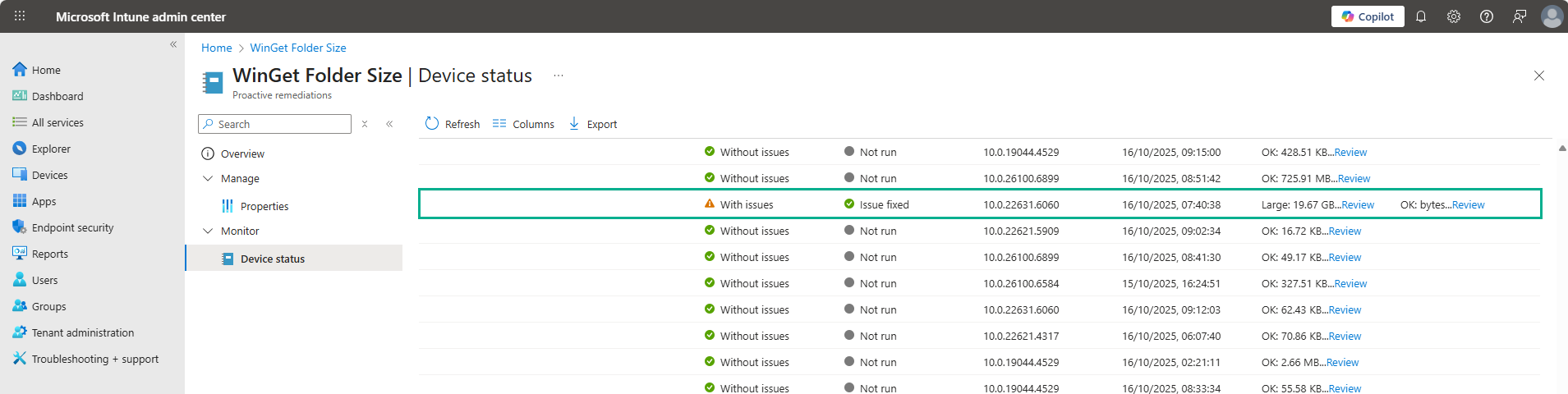
These columns will show the Write-Output results of the script. The results can be exported including the remediation status for further digging/reporting in Excel.
Microsoft Reference: IT1168328
Issue Description: Users may see their Windows Intune devices run out of disk space if they are utilizing the Intune Store application.
More info: While Microsoft are focused on long term remediation, admins may be able to delete the contents of the “%windir%\Temp\WinGet\defaultState” folder and restart the device to temporarily mitigate the issue.
Scope of impact: This issue may potentially affect any user with a Windows Intune device utilizing the Intune Store application.
Root cause: A recent update to the Intune Store application version contains a code issue that is causing error logging to take up too much disk space.

Leave a Reply