Previously, I discussed how the changes to Microsoft 365 licensing introduced new features and functionality. Without wanting or trying to create a series all about these new features and functionalities. I’m going to create a series all about these new features and functionalities… 🙂
In this particular article, I will explore how the inclusion of Remote Help, into the E3 licensing, benefits those using Intune (and those with E3, should they wish to use Remote Help!). Previously Remote Help was available as an additional Intune Suite component, but as of July 2026, it is now included as part of Microsoft 365 E3 licensing. For organisations already licensed for E3, this effectively removes one of the biggest barriers to adoption – the additional licensing cost. Which raises an obvious question:
If you’re already paying for Microsoft 365 E3, do you still need TeamViewer, ScreenConnect or another third-party remote support platform?
Let’s explore…
What is Microsoft Intune Remote Help?
Remote Help is Microsoft’s cloud-native remote assistance solution, designed specifically for managed Windows devices (Important note!). Rather than existing as a completely separate product, it’s tightly integrated into the Microsoft management ecosystem, including:
- Microsoft Intune
- Microsoft Entra ID
- Conditional Access
- Intune RBAC
- Device compliance
- Microsoft security auditing
Support sessions are authenticated using Entra identities, and administrators can apply Conditional Access policies to help control who can initiate or receive remote assistance. Because it’s integrated with Intune, support staff can quickly move from viewing a device in the admin centre to assisting the user directly.
For organisations already operating a cloud-native endpoint strategy, that integration is a significant advantage.
What are other, more common tools?
Below I highlight the pros and cons of TeamViewer, ConnectWise Control (ScreenConnect) and BeyondTrust Remote Support (formerly Bomgar). I picked these purely as they’re the three I’m familiar with or the ones I see most commonly. Should you use or know of another tool, these comparisons could act as a good foundation for playing “your tool” off against one of these.
TeamViewer
TeamViewer remains one of the most recognised names in remote support.
Strengths
- Extremely mature product
- Cross-platform support
- Excellent unattended access
- Fast connection performance
- Rich collaboration features
Considerations
- Separate licensing costs
- Separate administration portal
- Another agent to deploy and maintain
- Identity and security management sits outside the Microsoft ecosystem
For organisations supporting a mixture of Windows, macOS, Linux and external customers, TeamViewer still offers one of the most feature-rich platforms available.
ConnectWise ScreenConnect
ScreenConnect has become particularly popular with MSPs and enterprise support desks.
Strengths
- Outstanding unattended support
- Powerful technician tooling
- Session recording
- Flexible deployment options
- Highly customisable
Considerations
- Separate infrastructure or SaaS platform
- Additional licensing
- Independent user administration
- More operational overhead than an integrated Microsoft solution
For organisations with a dedicated service desk handling thousands of support requests every month, ScreenConnect continues to be an exceptionally capable platform.
BeyondTrust Remote Support (formerly Bomgar)
BeyondTrust is often considered the enterprise benchmark where security and privileged access are the highest priority.
Strengths
- Exceptional security controls
- Privileged access integration
- Comprehensive auditing
- Enterprise-grade compliance
- Excellent unattended access
Considerations
- Premium pricing
- More complex implementation
- Often more functionality than smaller organisations actually require
Large regulated industries such as finance, healthcare and government frequently favour BeyondTrust because of its extensive security capabilities.
How does Remote Help stack up?
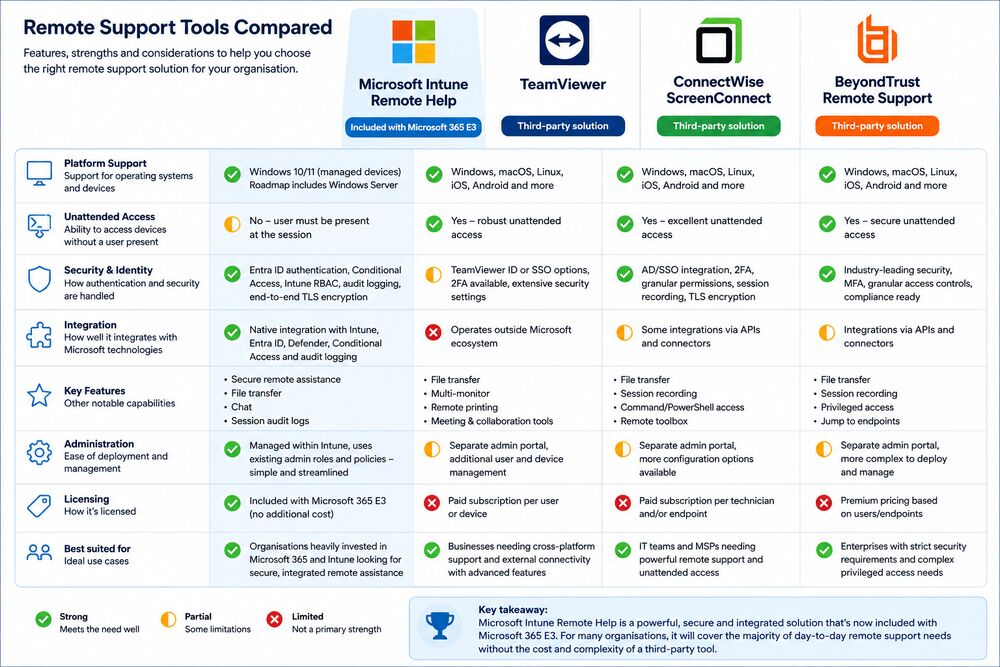
No remote support product is perfect, and each has strengths depending on your environment. The graphic below acts as a one page shootout guide. It’s worth noting that one of the most common “issues” raised with Microsoft’s Remote Help, is the lack of unattended access — but it’s no secret that this is being worked on. Leaving the only other “issue” being that the Microsoft offering only supports Microsoft platforms, for now?
Where Microsoft Remote Help shines
Remote Help doesn’t necessarily offer every feature found in the established market leaders. What it does offer is something many competitors can’t compete with, and that is that it’s part of the Microsoft ecosystem. Which means:
- No additional vendor relationship
- No additional remote support agent
- Entra ID authentication
- Intune RBAC integration
- Conditional Access support
- Centralised auditing
- Native Intune deployment
- Familiar Microsoft administration experience
For organisations already standardising on Microsoft Intune, these aren’t minor benefits, they simplify administration and reduce operational complexity.
The other major advantage is cost. Historically, many organisations dismissed Remote Help because it required purchasing an additional Intune Suite licence. That’s no longer true for Microsoft 365 E3 customers. If you’re already licensed for E3, Remote Help is now included as part of the subscription.
Are there any limitations?
Yes.
If your organisation relies heavily on unattended support, remote access to servers, supporting unmanaged devices, or providing assistance to third parties outside your Microsoft tenant, you’ll probably still find products like TeamViewer, ScreenConnect or BeyondTrust offer greater flexibility.
Similarly, organisations with mature service desks may value advanced capabilities such as:
- Persistent unattended endpoints
- Technician scripting
- Remote toolbox utilities
- File transfer automation
- Wake-on-LAN
- Extensive session recording
- Multi-tenant management
- Additional platform support (!)
These are areas where dedicated remote support platforms still have an advantage.
My thoughts
I don’t believe Microsoft is trying to replace every enterprise remote support platform overnight. Instead, I think they’re removing another reason for organisations to purchase third-party tools where Microsoft can provide a “good enough” alternative. For many businesses already using Microsoft Intune, Remote Help may now satisfy 80-90% of their BAU support requirements without introducing another vendor, another licensing agreement or another management console.
If you’re already paying for Microsoft 365 E3, I’d certainly recommend giving it a proper evaluation before renewing your existing remote support contract. You may conclude that TeamViewer, ScreenConnect or BeyondTrust still offer capabilities your organisation genuinely needs. But you might also discover that the remote support tool you’ve been paying for is now solving a problem that Microsoft has already included in the licence you’re paying for – and with that, you might find you’re entertaining thoughts about running two Remote Support platforms for Windows & other devices. A thought which completely contradicts the “simplification” benefits, but one that might be very cost efficient if finances are a driver.

Leave a Reply