Day 2 of Ignite, and I’m sticking with my Intune and device-management interests. The day’s Intune programme focused on the device lifecycle and governing local AI agents, but it was Microsoft’s accompanying article on faster device management that caught my attention. It touched on something rather closer to home for any administrator: the waiting. Waiting for an assignment, waiting for a device to respond, then waiting for the portal to confirm whether the thing you’ve asked for has actually happened.
Waiting is actually one of the beautiful “benefits” to being an administrator. I coined the phrase “Microsoft Minutes”, and have stood by it through years of SCCM and Intune Administration. Nothing in SCCM or Intune happens fast, which, is actually nice from an admin point of view. You set out your benchmarks and guidelines to manage expectations, and then you just ……. wait. Glamorous? Perhaps not. Relevant? Absolutely.
The problem is, no one has patience any more, and with AI, we’re all expected to do five things in the time we used to perform one thing.
So yesterday, when Microsoft published Intune’s journey to faster device management, it offered up a useful insight into recent improvements, especially around faster, more slicker device management via Intune. Day 1 had bigger announcements and for me, was more about bells & whistles/toys and “what’s coming”, things for the wish list perhaps. Day 2, however, for me was more about the enhancements to every day life, especially those of an administrator. The little things that we’ll soon come to take for granted…
Not all enhancements discussed below are currently live, but we know throughout the course of this year, that things under the hood have been changing. Intune administrators are probably familiar with the term IC3 (Intelligent Conversation and Communications Cloud), or just generally aware that Microsoft are working on enhancing the speed in which things occur.
Faster delivery, faster reporting, faster everything
In the previously linked article from Microsoft, it describes work on both getting changes to devices and making the resulting state visible. Report timestamps are rolling out, while further work on distinguishing intended configuration from reported state is still underway.
That separation is useful. If I’m investigating a missing application, I want to know where the delay sits. Was the device targeted? Did it receive the work? Did installation complete? Am I looking at fresh evidence? Refreshing the same page repeatedly doesn’t answer those questions, even if it feels productive for the first thirty seconds.
My practical response would be to build a small test around those stages. I’d record the assignment time, the device-side result and when reporting catches up. I’d want enough evidence to explain a delay rather than give the service desk a vague instruction to wait longer.
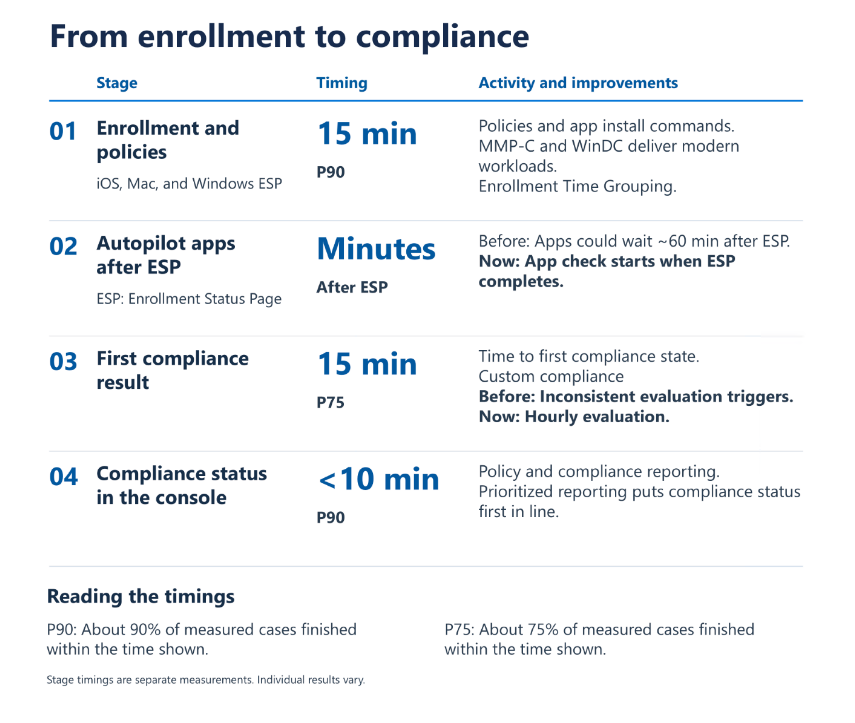
In terms of “faster everything”, the linked article includes the following graphic, which shows quite clearly where speed enhancements are being made and likely to be seen.
The eight-hour phone home, isn’t really a thing
The article explains that previously published, and often lived by, routine maintenance cadence isn’t the delivery schedule for every change. There is a common misconception that “every” (or most) changes applied within Intune will take ~8 hours to land, or that the device only checks in every 8 hours. Microsoft are stating that this simply is not true, and that supported push notifications also prompt check-ins, including for Intune Management Extension workloads.
My go to line when assisting users was that “changes might take up to 24 hours”, often the change(s) were immediate, or worst case, within the hour, but still… this advice was more to manage expectation and avoid Service Desk overload. But the reality is, and has been for a long while, that this doesn’t really stack up any more. And whilst there’s benefit in still managing expectation, to an extent, I probably need to rethink my wording and advice.
Sync is getting a more useful explanation
Microsoft describes an improved Windows Sync action that initiates check-ins for both the MDM client and IME, while those components continue processing independently. Currently, you, via Intune initiates a Sync, or you instruct the user to perform a Sync from within Windows/Company Portal, and then you lose all sight of it. That’s due to change, as enhancements allow administrators to follow the request and monitor progress.
This can be useful to support teams, who can now track each stage as it flows through the sync process, which can help the person following the runbook to know when to move on to the next diagnostic step.
My Day 2 summary in one sentence
Intune is getting slicker, GTA VI was released.
Actually, GTA VI technically released on Day 3 I suppose. I’ll blame GTA for the lazy summary and article altogether to be honest.

Leave a Reply